Rebuilding My Portfolio Contact Form Backend with AWS, Terraform, and GitHub Actions
Enhancing backend architecture for the contact form on my portfolio site with AWS resources, Terraform, and GitHub Actions for CI/CD.
Project Details
Rebuilding My Portfolio Contact Form Backend with AWS, Terraform, and GitHub Actions
On the surface, a contact form looks like one of the simplest features on a website. A visitor fills out a few fields, clicks submit, and the site sends the message along. It is easy to treat that kind of feature as an afterthought.
I learned that’s not the case if you decide to build one on your own!
My portfolio site is built with Next.js and hosted on Cloudflare Pages, but the contact form submission flow hands off to AWS for processing. What started as a small website feature became a great opportunity to improve deployment, security, account structure, and CI/CD practices in a way that mirrors the kinds of patterns I want to keep using across future projects.
The end result is an AWS backend that is far more robust than it was before, along with a better-organized AWS environment and a reusable foundation for future cloud work.
The architecture at a glance
The frontend of my site lives on Cloudflare Pages. The contact form itself is built in React, uses Zod for validation, and includes Cloudflare Turnstile for bot protection. That covers the user-facing side well, but the more interesting work begins after the form is submitted.
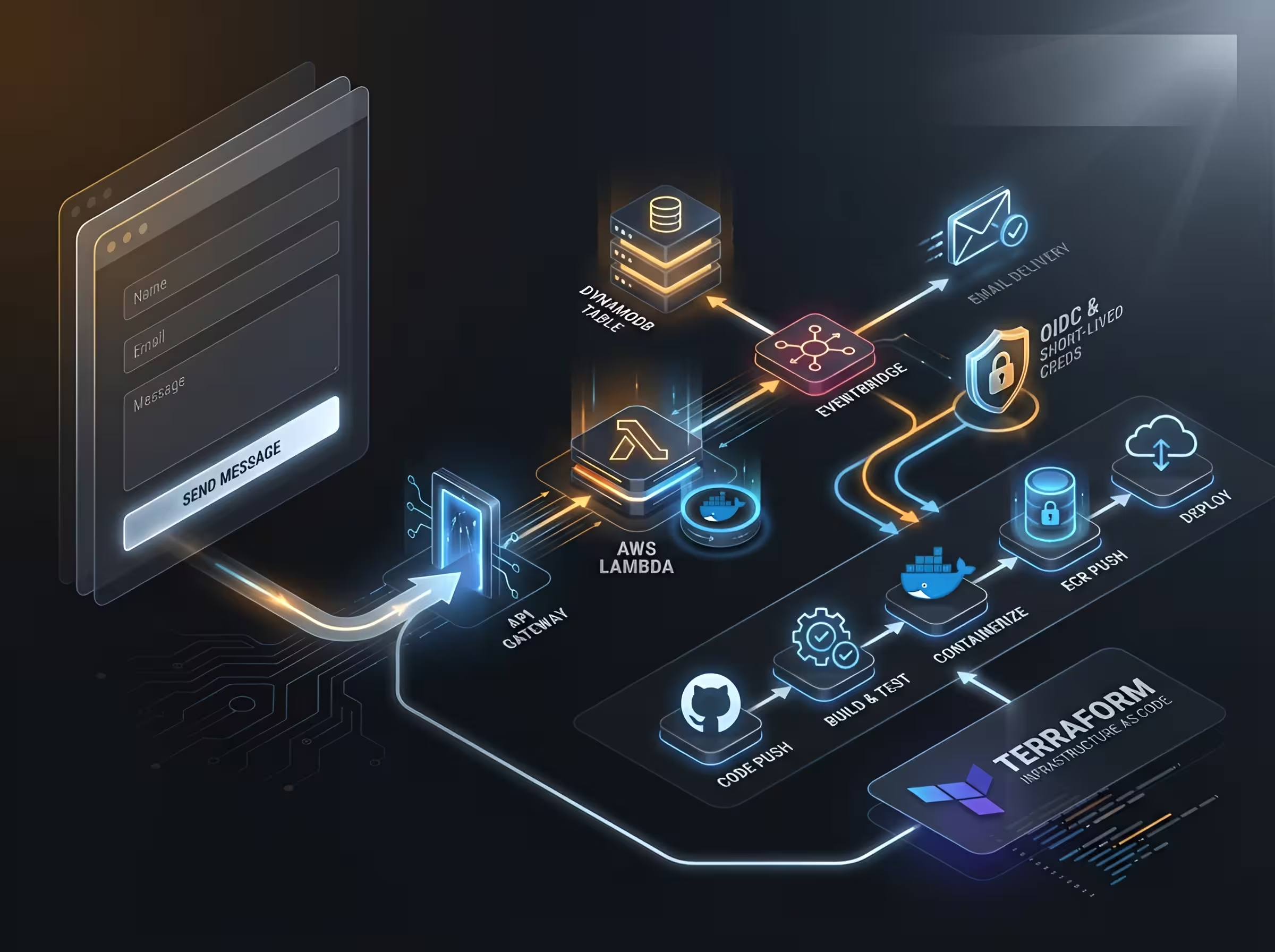
The request flow looks like this:
A user submits the form on my Next.js frontend. That submission is sent to an API Gateway endpoint at /leads. API Gateway invokes a Lambda function called lead-processor, which validates the payload again on the backend, writes the submission to DynamoDB, and emits an event to EventBridge. From there, another Lambda function called email-notifier reacts to the event and uses Resend to send me an email with the contents of the submission.
That may sound like a lot of moving parts for a contact form, but each piece has a clear responsibility. API Gateway handles the HTTP entry point. Lambda handles the application logic. DynamoDB stores the lead. EventBridge decouples the intake path from downstream actions. Resend handles email delivery. Together, that creates a clean event-driven flow rather than a single function trying to do everything at once.
What the original setup looked like
The original version of this backend worked, but it was not where I wanted it to stay.
The Lambda functions were being deployed as ZIP files uploaded through a manually run script. That approach was functional, but it came with the usual drawbacks: more bootstrapping, less repeatability, and a deployment process that was somewhat fragile. It also kept the workflow closer to “get it running” than “build it in a way I can keep scaling and reusing.”
That became the theme of this rebuild. The goal was not to add complexity for its own sake. The goal was to replace a working but limited setup with one that was more consistent, more secure, and more aligned with modern cloud delivery practices (oh, and of course learning important things along the way!).
Moving from ZIP-based Lambdas to container images
One of the biggest changes was replacing ZIP-based Lambda deployments with containerized Lambda functions.
I wrote Dockerfiles for each Lambda and moved to container images stored in Amazon ECR. That meant the deployment process no longer depended on manually packaging ZIP artifacts and uploading them with a script. Instead, the functions are now built through a repeatable container workflow that is much easier to reason about and automate.
# Build stage
FROM public.ecr.aws/lambda/nodejs:24.2026.03.12.12 AS builder

WORKDIR /var/task

COPY package*.json ./

RUN npm ci

COPY . .

RUN npm run build

# Runtime stage
FROM public.ecr.aws/lambda/nodejs:24.2026.03.12.12

WORKDIR /var/task

COPY --from=builder /var/task/dist ./dist

CMD ["index.handler"]
This change also improved how I think about the Lambda functions themselves. Packaging them as container images makes dependency handling more explicit and gives me tighter control over how each function is built. It also fits much more naturally into a CI/CD pipeline where images are built, scanned, pushed, and deployed through a predictable sequence.
Terraform had to evolve along with that change. I added the necessary resources for ECR and the image-based Lambda configuration, and I removed resources that were no longer needed from the earlier approach. This was a good reminder that infrastructure code benefits from cleanup just as much as application code does. Adding new resources is only part of the job. Removing stale ones matters too (and for my own sanity).
Improving the AWS foundation
One of the most valuable parts of this work had nothing to do with the contact form logic itself.
Before this rebuild, my AWS setup was too flat (I set it up long ago as my first learning project and it just sat there). I had a single management account that also contained deployed resources. That is not a good long-term pattern. Management accounts should stay focused on billing, organization-level administration, and governance. They should NOT double as general-purpose workload accounts from what I learned!
I restructured the environment so it more closely reflects how AWS organizations are meant to be used. I created a new account called portfolio-prod inside my organization and placed it under a Workloads organizational unit. That gave me a dedicated place for deployed application resources, while leaving the management account to handle organizational responsibilities.
I also cleaned up access. Previously, the environment included the default root login, an admin IAM user, and an SSO user through IAM Identity Center. After moving the workloads into the proper account, I deleted the old admin IAM user and made sure access was handled appropriately through Identity Center instead. That made account switching cleaner and reduced reliance on long-lived user credentials.
Moving infrastructure between accounts is the kind of work that can go badly if handled carelessly, so I treated it with caution. Terraform state was moved to the new S3 backend and verified before I destroyed any resources in the management account. Once I confirmed the new environment was behaving correctly, I used terraform destroy to efficiently remove the old deployed resources from the management account (I didn’t want to click through nearly 40 resources in the AWS console and delete each one manually).
This part of the project may not be the most visually interesting, but it was one of the most important. A better account structure reduces confusion, improves separation of duties, and gives future projects a much healthier place to live from the start.
Now that housekeeping is done and I can breathe easier, it’s time for the fun parts!
Replacing static credentials with GitHub OIDC
Another major improvement was how GitHub Actions authenticates to AWS.
Instead of relying on long-lived static access keys stored as secrets, I set up OIDC with Terraform so GitHub Actions can assume a role and receive short-lived credentials when the workflow runs. This is one of those upgrades that feels small when described in one sentence, but it has a big impact on the security posture of a deployment pipeline. It wasn’t easy to wrap my mind around at first but now that I understand it, I can use this pattern for future projects as well.
Static credentials create ongoing risk. They have to be stored, rotated, protected, and eventually cleaned up. OIDC shifts that model toward federation and short-lived access, which is a much better fit for modern CI/CD systems.
This was also a highly reusable improvement like I said before. The immediate benefit was a more secure pipeline for my portfolio backend, but the bigger value is that I now have a pattern I can carry into future projects. That is often the best kind of project work: solving today’s problem in a way that helps with tomorrow’s too.
Building a simple but solid deployment pipeline
The GitHub Actions pipeline for this project is intentionally straightforward, but it does meaningful work.
name: Build & Deploy Lambda's

on:
  workflow_dispatch:
  pull_request:
    branches: [main]
    paths:
      - 'lambda/**'
      - 'terraform/app-portfolio/**'
  push:
    branches: [main]
    paths:
      - 'lambda/**'
      - 'terraform/app-portfolio/**'

env:
  ECR_REGISTRY: ${{ secrets.AWS_ACCOUNT_ID }}.dkr.ecr.${{ secrets.AWS_REGION }}.amazonaws.com
  FORCE_JAVASCRIPT_ACTIONS_TO_NODE24: true

jobs:
  build-and-deploy:
    runs-on: ubuntu-latest
    permissions:
      id-token: write
      contents: read

    steps:
      - uses: actions/checkout@de0fac2e4500dabe0009e67214ff5f5447ce83dd # v6.0.2

      # Always runs - validates Dockerfiles on PRs and push, Trivy scans
      - name: Build email-notifier image
        run: docker build -t email-notifier ./lambda/email-notifier

      - name: Scan email-notifier image with Trivy
        uses: aquasecurity/trivy-action@57a97c7e7821a5776cebc9bb87c984fa69cba8f1 # v0.35.0
        ...
It runs on pull requests and pushes to main, and I have also used workflow_dispatch temporarily for manual testing while refining the workflow. The pipeline checks out the code, builds both Lambda images, scans them with Trivy, and on pushes to main, logs into ECR, pushes the images, and updates the Lambda functions with the correct commands.
I also pinned all GitHub Actions to full commit hashes. That is a small detail, but it matters from everything I’ve read. Pinning actions improves reproducibility and helps reduce supply-chain risk compared to floating tags. It is the kind of habit that is easy to skip in personal projects, which is exactly why I wanted to keep it.
There is still room to grow in this pipeline, but that is part of what makes it useful. It already provides reliable automated delivery, and it gives me a clean place to expand later with additional testing, stronger policy checks, and more advanced deployment logic.
Adding observability to the pipeline itself
One of my favorite parts of this setup is that I am not only observing the application path. I am also observing the delivery process.
I created a second GitHub Actions workflow that uses the workflow_run trigger to watch for completion of the main build-and-deploy workflow. When that workflow finishes, the second one exports timing telemetry data to Honeycomb.
That lets me build Honeycomb boards around pipeline health and performance instead of treating CI/CD as a black box. It is a small addition, but it reflects a broader mindset I care about: observability is not just for applications and infrastructure. It can also be applied to the systems that build and deliver them. Optimization shouldn’t just be surface-level, right?
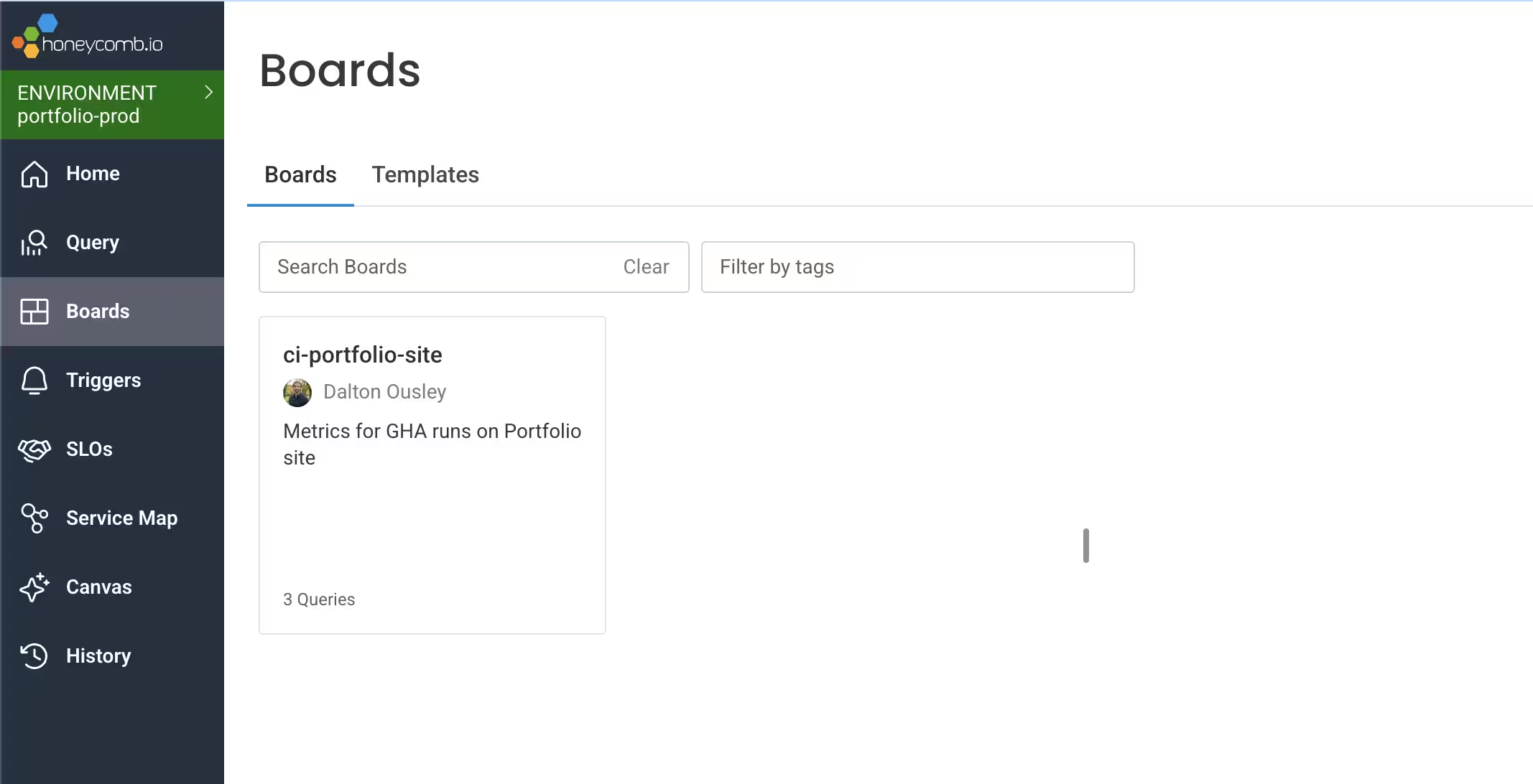
This will hopefully become even more useful later when I add self-hosted runners. Once my homelab is finished, I want to compare the behavior of GitHub-hosted runners against my own runners and see how they differ in speed, consistency, and overall workflow characteristics.
Honeycomb gives me a great place to visualize that over time.
The current Trivy tradeoff
Not every part of the rebuild landed in its final form, and I think that is worth documenting honestly.
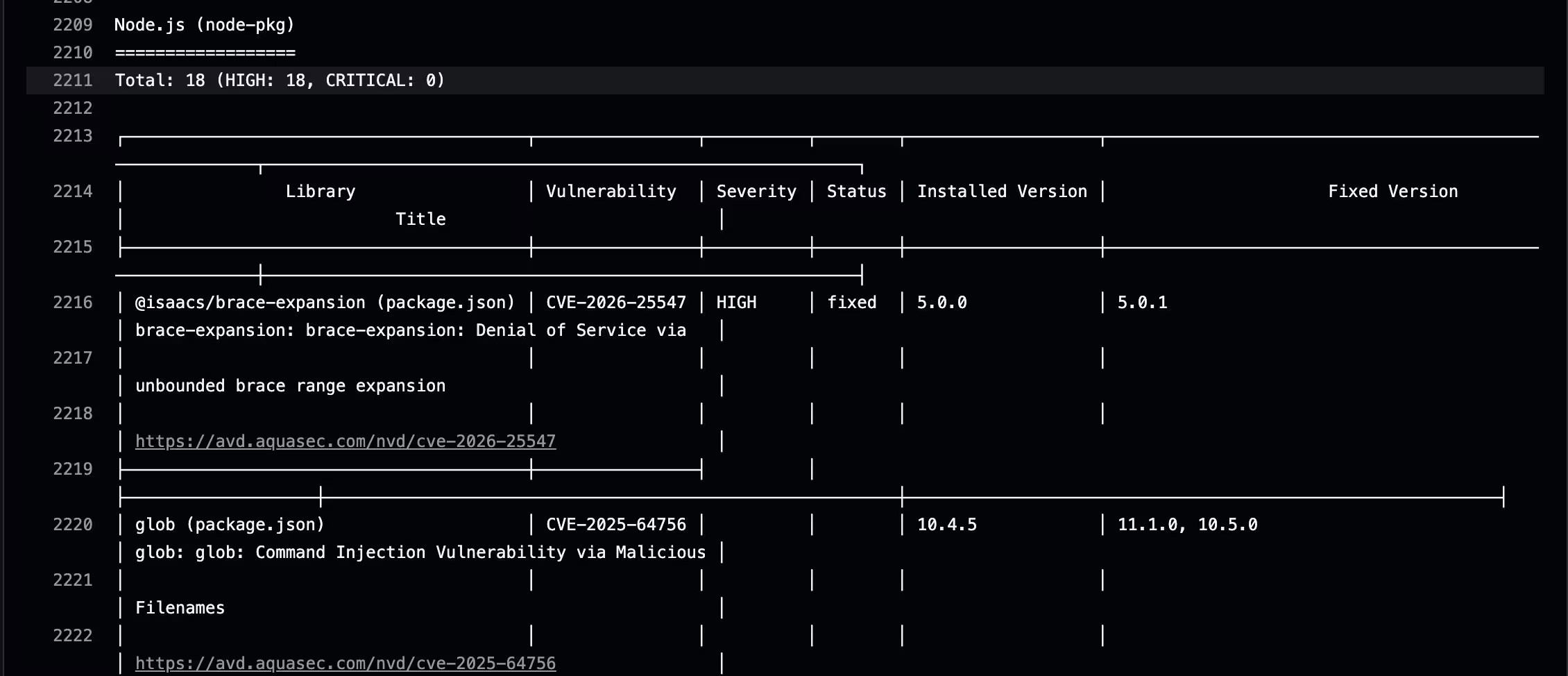
Right now, the Lambda base image I am using reports 18 HIGH vulnerabilities in Trivy. Initially, that was a blocker for the workflow. For the time being, I changed Trivy to use a non-blocking exit code so the pipeline could continue while I investigated the results and decided on the right next steps.
This is where context matters.
The Lambda images use a multi-stage build, and the final image only contains the built /dist output for the functions rather than the full build-time environment. That changes the real risk picture compared to what a raw scan result might imply at first glance. In other words, a vulnerability report is useful, but it still needs interpretation.
That said, I do not want to leave Trivy non-blocking permanently. My goal is to get back to meaningful blocking behavior once I improve the image strategy. The most likely next step is switching to a leaner base image that reduces the attack surface area from the start. I am less interested in maintaining a large ignore file by hand unless there is a very specific, justified reason for it.
I am also interested in experimenting with an enrichment workflow around scan results. One idea is to take the Trivy output artifact, send it into my self-hosted n8n environment, and use AI to enrich the findings with summaries, likely impact, and alerting routes such as Discord notifications. I want to be clear about how I think about that: AI would not be making the security decision for me. It would be an enrichment layer that helps me review findings faster and with more context! The decision and responsibility would still stay with me of course.
That distinction matters. In my view, this is a good fit for a personal engineering environment where I can safely explore ideas and improve how I triage information. It is not a replacement for deterministic security controls and should not be relied upon at home or in production! It is simply a way to make those controls more useful (to me).
What I want to add next
This rebuild gave me a stronger backend and a better cloud foundation, but it also created a clear roadmap for what comes next.
I want to revisit the Lambda base images and restore truly blocking container scans for legitimate issues. I also want to add SAST and DAST (possibly) to broaden the security coverage of the project (and just for fun and learning like always). Part of that is about improving the project itself, and part of it is about getting more hands-on practice with security tooling in a CI/CD context.
Beyond security, I want to keep expanding the telemetry side of the workflows and eventually compare GitHub-hosted runners with self-hosted runners once my homelab environment is ready. That will create a nice bridge between this AWS-based portfolio backend and the platform engineering work I am doing elsewhere.
What this project taught me
This project started with a form submission path and ended with much more than that.
It gave me a cleaner Lambda deployment model through container images and ECR. It pushed me to improve my AWS organization structure by separating workload resources from the management account. It let me replace static cloud credentials with short-lived, federated access through GitHub OIDC. It gave me a more capable GitHub Actions pipeline, plus a way to observe the pipeline itself with Honeycomb.
Most importantly, it reinforced something I keep finding across technical projects: small features are often where strong engineering habits get built. A contact form may not sound like much, but it touches validation, security, event-driven design, infrastructure as code (IaC), cloud identity, automated delivery, and observability. That makes it a surprisingly good place to practice production-minded thinking.
For me, that is what this rebuild was really about. Not taking a simple feature and making it flashy, but taking a simple feature seriously enough to build it on patterns I can trust and reuse. It was great to get some hands-on experience with AWS resources as well coming from recent work with GCP. I look forward to expanding my use of these cloud providers as well as my own hardware for future projects.
Thanks for stopping by!
More from DaltonBuilds
Check out my repo's: https://github.com/DaltonBuilds