The Middle Layer: How Ansible Fits Between Terraform and GitOps in My Homelab
How Ansible handles the OS layer between Terraform provisioning and GitOps workloads — the three-repo architecture, playbook breakdown, and real trade-offs.

Project Details
The Middle Layer: How Ansible Fits Between Terraform and GitOps in My Homelab
Terraform provisions the VMs. ArgoCD manages the Kubernetes workloads. But there's a layer in between those two that doesn't get much spotlight — the OS layer.
SSH hardening. Base packages. Timezone. Tailscale on every node (so I can still access things from my favorite coffee shop). k3s installed with the right flags so Cilium can actually own the network. node_exporter running as a systemd service so Prometheus has something to scrape. None of this is complicated on its own. Doing it by hand once, on a handful of nodes, is totally fine.
Doing it a second time (after you've blown up the cluster or you are starting over for funzies) is where "I'll just SSH in real quick" falls apart. By the third time you've fat-fingered the k3s install flags or forgotten to disable password auth on one of the nodes, the argument for automation can't be missed...
That's where Ansible lives in my homelab. It's not the flashiest piece of the stack. But it's what closes the gap between "Terraform just created some VMs" and "k3s is ready for GitOps to take over."
What Ansible Is (the short version)
I'll keep this brief because most people reading this are already in the DevOps orbit and just need a quick orient.
Ansible is an agentless configuration management tool. You write declarative YAML playbooks that describe the desired state of a host (VMs and bare metal) — packages installed, files in place, services running, users configured. It connects over SSH, runs tasks sequentially, and is designed to be idempotent (run it twice, get the same result). There's no daemon to install on target hosts. As long as SSH and Python are available, Ansible can manage it.
It's push-based: you run playbooks from your local machine (or a control node) against a static or dynamic inventory of hosts. That's about as complicated as it gets conceptually. The value is in what you encode in the playbooks.
Where It Fits — The Three-Repo Architecture
This is probably the most distinctive thing about how I've structured my homelab, and the thing I'd most want someone to take away from this post.
My homelab infrastructure is split across three separate repos, each with a clearly scoped responsibility:
- homelab-terraform — Provisions VMs and LXC containers on Proxmox (I currently have an M920 SFF for this and plan to expand to another machine as well). When Terraform is done, I have fresh nodes with cloud-init SSH keys injected. Nothing else yet.
- homelab-ansible — Configures the OS on every node. This is the repo this post is about. When Ansible is done, every host (VMs from Proxmox and my M920q bare metal nodes) is hardened, has the right packages, is connected to Tailscale, and — for the k3s nodes, has the cluster software installed with the right flags.
- homelab-gitops — Brings up all Kubernetes workloads via ArgoCD. This is what I wrote about in the original k3s post and part two on persistent storage. By the time GitOps kicks off, it's expecting a healthy cluster underneath it.
The reason for separating these concerns is that each layer is independently runnable, testable, and replaceable. If I want to change how a VM is provisioned, I touch Terraform and Terraform alone. If I want to change how k3s is installed, I change the Ansible playbook and I don't need to think about Terraform outputs or ArgoCD apps at the same time.
More practically... This separation means I can do a partial rebuild. If I'm iterating on the Ansible layer, I don't need to re-provision VMs first. If I'm testing a GitOps change, I don't need to re-run Ansible. Each layer leaves the system in a well-defined state that the next layer can depend on.
The full pipeline, from bare metal and Proxmox to a running cluster, looks like:
homelab-terraform → homelab-ansible → homelab-gitops
(provision)          (configure OS)    (workloads)
Obvious in retrospect. Much better than one enormous repo where "infrastructure" means everything.
The Inventory — What Ansible Manages
My inventory is split into three groups:
| Group | Hosts |
|---|---|
baremetal | gandalf (control plane), aragorn, legolas (workers) |
proxmox_vms | nfs-server, mgmt-plane, gimli |
proxmox_lxc | garage |
The bare-metal nodes are the three Lenovo M920q machines that have been running k3s since the beginning. The Proxmox VMs and LXC containers are newer additions — a dedicated NFS server backed by ZFS, a management plane running its own single-node k3s for the observability cluster, and garage (a self-hosted S3-compatible object store running inside an LXC container).
There's one LXC-specific quirk worth calling out. Bare-metal and VM hosts use ansible_user: dalton — cloud-init creates the user during provisioning, so Ansible connects as a non-root user. LXC containers use ansible_user: root instead, because Proxmox LXC doesn't support cloud-init user creation from what I could find. Terraform injects SSH keys for root on those containers, which is why the inventory diverges.
What the Playbooks Actually Do
The full playbook lineup lives in the homelab-ansible repo. Here's the high-level breakdown:
| Playbook | Target | What it does |
|---|---|---|
common.yaml | All hosts | Base packages, user/SSH hardening, node_exporter, timezone |
k3s-server.yaml | Control plane | k3s install with Cilium flags, Gateway API CRDs |
k3s-agent.yaml | Workers | k3s agent join |
nfs-server.yaml | nfs-server | ZFS pool + NFS export (/tank/k8s) |
garage.yaml | garage | Garage S3 binary, systemd unit, bucket setup |
mgmt-plane.yaml | mgmt-plane | Single-node k3s for the observability cluster |
tailscale.yaml | All hosts | Tailscale installation and auth |
vault-config.yaml | localhost | One-time Vault bootstrap: secrets engines, ESO reader policy, Kubernetes auth |
site.yaml runs all of them in order for a full rebuild — minus vault-config.yaml, which I'll get to in a moment.
common.yaml is the one that runs everywhere and sets the baseline. The most relevant tasks: apt update, install base packages (curl, wget, vim, htop, jq, prometheus-node-exporter), ensure the dalton user exists with sudo, drop in the SSH authorized key, set timezone to America/Denver, and harden SSH — no password auth, no root login. Nothing revolutionary, but it's the kind of thing that's tedious to do manually and easy to miss on one node.
For the k3s install, the playbooks use install flags that are worth highlighting separately (more on those in the next section).
Ansible Galaxy collections used are tracked in requirements.yaml. The short version is: run ansible-galaxy collection install -r requirements.yaml once before anything else. community.hashi_vault also requires the hvac Python library (pip3 install --user hvac).
Notable Decisions and Trade-offs
This is the section I actually want to write, because the "why" behind the configuration choices is more interesting than the configuration itself.
No UFW on k3s nodes
If you look at common.yaml, you'll notice there's no UFW or iptables configuration for the k3s nodes. That's intentional.
k3s is installed with Cilium as the CNI, running in eBPF mode with kube-proxy replaced. Cilium owns the network policy layer entirely. Running host-level firewalling on top of Cilium creates conflicts — you end up with two things trying to manage the same netfilter hooks, and debugging it is not fun. The explicit decision was to omit host firewalling on k3s nodes and let Cilium handle it.
The k3s install flags reflect this:
--flannel-backend=none \
--disable-network-policy \
--disable-kube-proxy \
--disable traefik \
--disable servicelb
No flannel, no built-in network policy, no kube-proxy. Cilium takes all of it. This is baked directly into k3s-server.yaml and k3s-agent.yaml.
vault-config.yaml is excluded from site.yaml
There's a chicken-and-egg problem with Vault (at least with this homelab iteration). The vault-config.yaml playbook bootstraps HashiCorp Vault; it sets up secrets engines, creates the ESO reader policy, and configures Kubernetes auth. But it requires Vault to already be initialized, unsealed, and accessible. It also needs a root token at runtime.
Running it as part of site.yaml doesn't make sense — Vault itself is deployed by the GitOps layer, not Ansible. So vault-config.yaml is explicitly excluded from the main site run and invoked separately after Vault is up:
ansible-playbook playbooks/vault-config.yaml --ask-vault-pass \
  --extra-vars "vault_token=$(pass homelab/vault-root-token)"
This is a deliberate one-time operation, not something that runs on every rebuild.
Ansible Vault for secrets — manual by design
Sensitive values (Tailscale auth keys, tokens, etc.) live in group_vars/all/secrets.yaml, encrypted with Ansible Vault. Every playbook run that needs secrets gets --ask-vault-pass at the command line.
This is manual by design in v3. It's not elegant, but it's simple and it works. The alternative — a CI/CD system that knows the Vault passphrase — introduces its own complexity and attack surface. For a homelab where I'm the only operator, trading automation for transparency was a reasonable call for this learning exercise. I'll revisit this in v4 (see below).
k3s install flags coded into the playbook
This one is a real coupling trade-off. The k3s install flags in k3s-server.yaml are tightly coupled to the assumption that Cilium will be deployed by the GitOps layer afterward. If someone runs site.yaml but never applies the GitOps layer, they'll have a k3s cluster with no working CNI (you've been warned).
The alternative would be to install k3s with a simpler default CNI and let GitOps swap it — but that's significantly more complex and introduces a cluster restart mid-deploy. Hard-coding the flags in is the simpler choice at the cost of that coupling.
The Outcome — What a Full Rebuild Looks Like
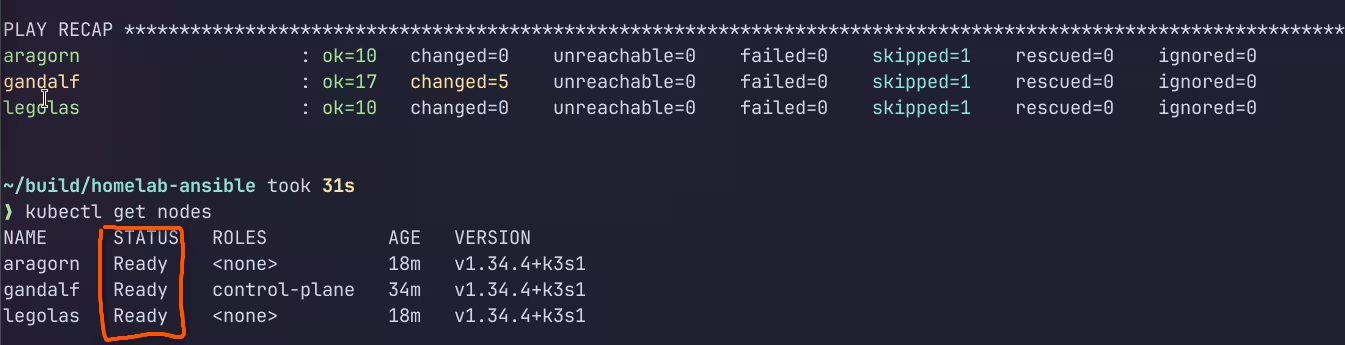
After Terraform has provisioned the virtual nodes and my bare metal machines are ready, the full Ansible run looks like this:
# One-time dependency setup
ansible-galaxy collection install -r requirements.yaml
pip3 install --user hvac

# Full rebuild — all hosts, all playbooks
ansible-playbook -i inventory.yaml site.yaml --ask-vault-pass
That's it. From fresh-provisioned nodes to a cluster-ready OS layer across all hosts in a single command. Common configuration applied everywhere, k3s installed and joined, NFS server set up, Tailscale connected, Garage ready to serve S3 requests.
The idempotency piece matters more than it sounds. Running site.yaml twice shouldn't break anything — and for the most part, it doesn't. The apt module, user management, and service state tasks are all designed to be idempotent by the Ansible module implementations. A few of the command module calls (especially around k3s installation) are less clean on re-runs, but they're wrapped in conditionals that check for existing installations before running.
The before-and-after comparison is straightforward: before, you have VMs with SSH keys and nothing else. After, you have nodes that are hardened, monitored, networked, and ready for GitOps to take over. The cluster doesn't exist yet at the end of Ansible (that's the GitOps layer's job). But everything it needs to build on is there.
What I'll be Improving in v4
My homelab v4 rebuild is going to involve some meaningful changes to this layer.
Drop Ansible Vault, move to Vault OIDC/AppRole for secret injection. The --ask-vault-pass flow works but doesn't scale well and can't run unattended (I'm a fan of automation, not manual work if possible!). The community.hashi_vault collection supports pulling secrets from HashiCorp Vault directly during playbook runs. The goal is to bootstrap Vault once, then have Ansible authenticate via AppRole (or machine identity) and pull secrets at runtime — no passphrase prompt (typing in --ask-vault-pass does get old).
k3s → RKE2 means new playbooks. v4 is moving to RKE2. That means new install procedures, a CIS hardening profile baked in, FIPS build options, and real etcd instead of SQLite. The k3s-server.yaml and k3s-agent.yaml playbooks will be replaced, not patched.
Dynamic inventory. Right now the inventory is a static YAML file. A second Proxmox host is coming (M920x), and managing two static inventory files is already unappealing. The Proxmox dynamic inventory plugin for Ansible (or a simple script against the Proxmox API) will be a much cleaner solution once the host count grows.
Tighter idempotency on command module calls. Some of the command module tasks — particularly around binary installs and k3s setup — rely on manual when conditions to avoid re-running. These are the most likely places for a re-run to cause problems. Wrapping them more carefully or replacing them with proper module calls where possible is on the list.
Closing
Ansible is the least visible layer of the three. It doesn't have a dashboard. It doesn't show up in ArgoCD. Once it's run and the cluster is up, it's basically invisible. You only really notice it when you have to rebuild from scratch and everything "just works," versus the alternative where you're 45 minutes into manual SSH sessions and wondering which node you forgot to harden.
That's the point. The OS layer should be boring. Reproducible, documented, and boring. Ansible is what makes it that way and I am forever a fan after this lab!
The playbooks are at github.com/DaltonBuilds/homelab-ansible if you want to poke around. They might look way different than described above since I am planning to do another iteration of my homelab build but I hope you find them useful!